





A thorough guide detailing the ins and outs of trading on the Adothria marketplace.

Overview

Welcome to trading on Adothria — the marketplace built for the Brighter Shores community. This guide is your end-to-end introduction: how our trade flow works, how to operate the dashboard like a pro, and what it means to be a trusted participant in the trading community.
Whether you're flipping your first stack of materials or running a full-blown shop, this is the place to start.
How trades work
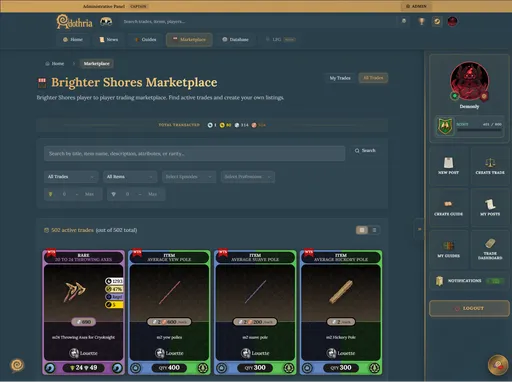
Every trade on Adothria runs on a fulfillment model. Each listing represents a pool of quantity, and accepted offers chip away at that pool until it's empty.
A quick example:
You list 100x Iron Ore for sale at
5 each. Buyer A buys 30, Buyer B buys 50, Buyer C buys 20. As each offer is fulfilled, your remaining quantity drops. Only when the quantity reaches 0 does your trade transition from
ACTIVE→COMPLETED.
This means a single listing can serve many buyers — you don't need to repost after every sale.
Trade states:
State | Meaning |
|---|---|
| Listing is live and accepting offers |
| Quantity exhausted, every accepted offer fulfilled |
| Pulled by the trade creator before completion |
Currency: Prices are set in copper,  silver,
  gold, and
  platinum (max 999 per denomination). The marketplace handles the math when you partially fulfill — per-item pricing stays consistent as quantity decreases.
Creating a trade
Posting a trade is a three-step wizard. New to it? Use this checklist to walk through your first listing — it'll remember your progress.
Your first listing
Step 1 — Trade type & item
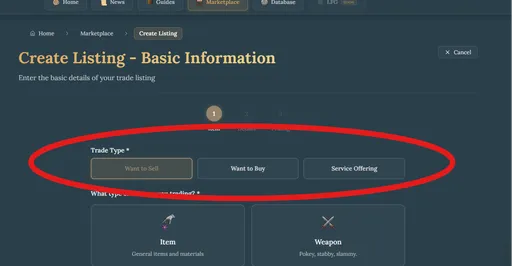
Start by choosing what kind of trade you're posting:
- Want to Sell (WTS) — you have an item, you want currency
- Want to Buy (WTB) — you want an item, you have currency
- Service Offering (advanced) — you're offering or requesting a service rather than an item
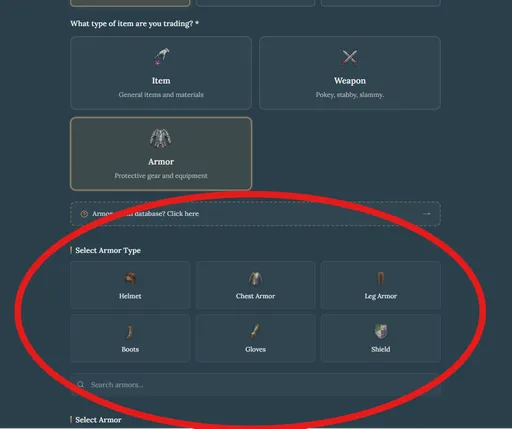
For WTS/WTB, pick the category:
- Item — general items and materials
- Weapon — pick a subtype: Two-Handed, One-Handed, or Ranged
- Armor — pick a slot: Helmet, Chest, Legs, Boots, or Gloves
Then search the item database to attach a specific item to your listing. Items in the database auto-fill episode and profession tags for you.
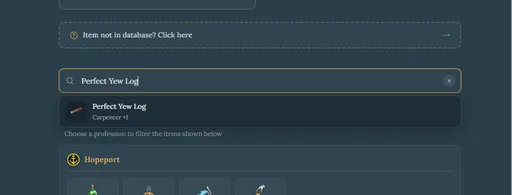
Item missing from the database?
Choose Other and enter the name manually — then suggest the missing item via our database submission flow. Approved suggestions earn you +2 contribution valor per accepted entry.
Step 2 — Details
Add a title (up to 200 characters) and a description (up to 2,000 characters). If you're not using a database item, you can upload your own image (5 MB max). For database items, the system uses the item's existing artwork.
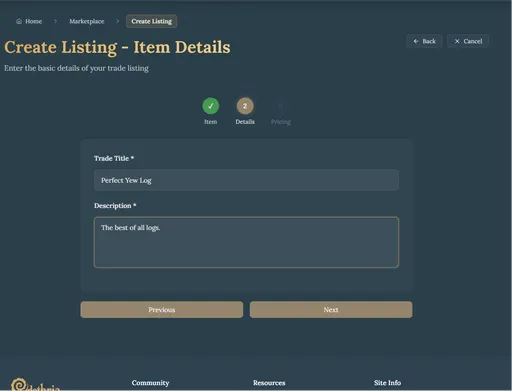
Step 3 — Pricing
Set the quantity and your asking price. The form shows you the per-item price as you adjust — useful for buyers comparing rates.
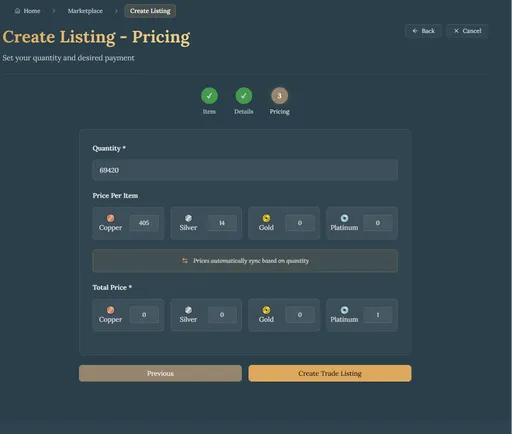
For Service trades, you set a base price plus optional per-item overrides, so a single service listing can carry different prices for each task you'll perform.
Your trade dashboard
This is mission control. The dashboard is split into three tabs — and you can explore them right here in the guide:
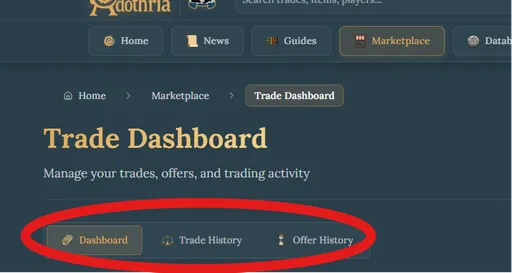
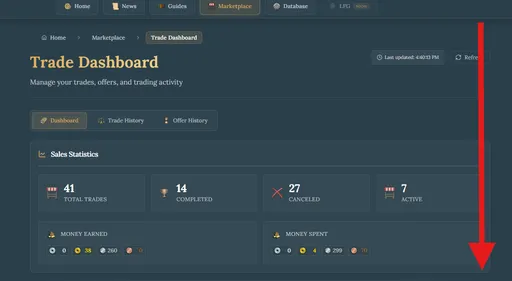
The default landing view, with four stacked sections.
Sales Statistics
A breakdown of your trading activity — volume, value, and trends over time. Track your conquest.
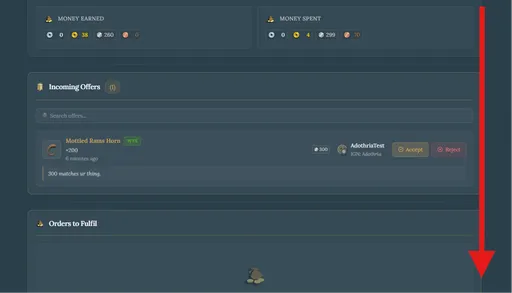
Incoming Offers
Pending offers buyers (or sellers) have placed on your listings.
- Accept — moves the offer into fulfillment
- Reject — declines the offer
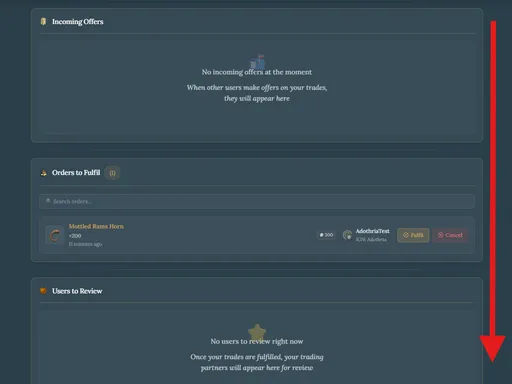
Orders to Fulfil
Once you accept an offer, it lands here — this is the active handoff stage. As the trade creator, you move the fulfillment forward. When the in-game exchange is done, mark it fulfilled — the offer transitions from FULFILLING → FULFILLED, your trade quantity decreases by the offer amount, and a review prompt opens up.
If you posted a WTS: you deliver the item to the buyer in-game, then mark the offer fulfilled.
If you posted a WTB: the seller delivers the item to you in-game. Once you have it, mark the offer fulfilled.
If something goes wrong, you can also cancel the fulfillment here with a stated reason (1–500 chars). The offer transitions to FULFILMENT_CANCELLED and the counterparty is notified.
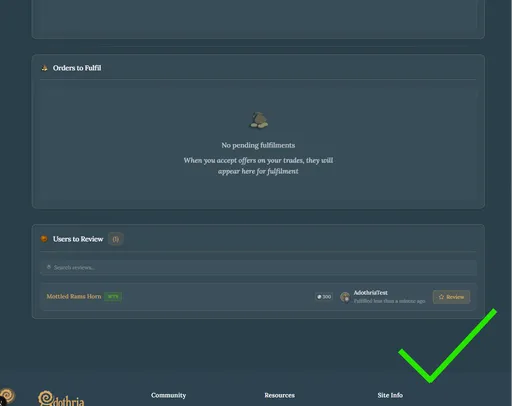
Reviewable Users
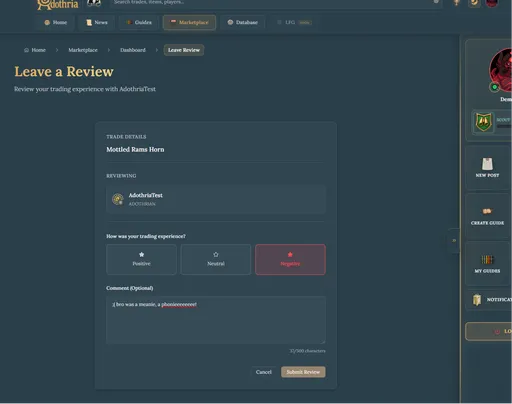
After fulfillment, your trading partner shows up here for you to review. Reviews are positive (+1), neutral (0), or negative (−1) — and positive reviews convert into trade valor for the recipient.
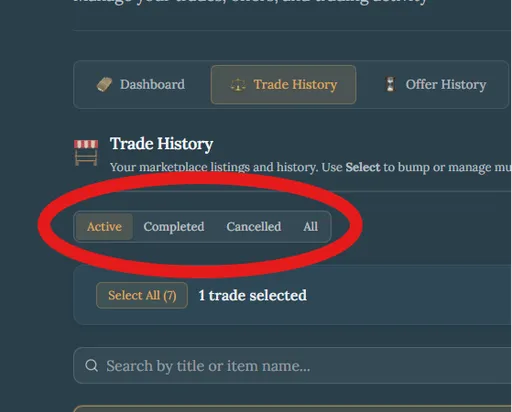
Your full record as a seller / lister. Filter the view by:
- Active — live listings (you can bump or cancel from here)
- Completed — fully fulfilled
- Cancelled — pulled before completion
- All — the full picture
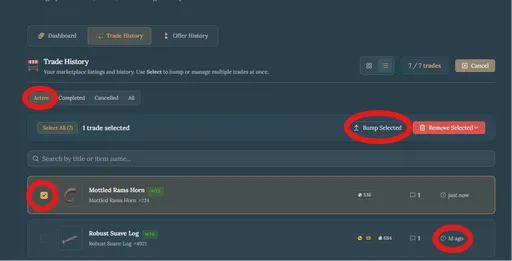
About bumping
Bumping refreshes your trade's position so it returns to the front of the marketplace feed.
When to bump for maximum reach
Cooldown: 24 hours per trade. Use it when your audience is online — bumping during peak hours moves more product than bumping at 4am. Watch the marketplace feed for a few days and you'll notice the activity windows for your timezone.
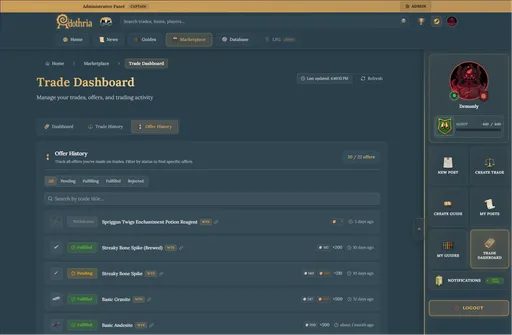
The mirror image of Incoming Offers — this is the status of every offer you've placed on other people's trades.
Trading rules
Be kind
Seriously — this is the single most effective way to navigate the marketplace. There's no upside to being hostile. Disagreements happen, but go in with the full picture and think your response through before you send it. The community remembers both the good and the bad.
Follow through where you can
Once an offer is accepted, both parties have agreed in good faith. If you're the trade creator, do your best to deliver — but if something legitimately goes wrong (you no longer have the item, the buyer is unreachable, the deal falls apart), use the Cancel Fulfillment action with an honest reason. That's exactly what it's there for. What we discourage is silently ghosting an accepted offer.
Price honestly
Bait pricing and misleading titles damage trust. List what you actually have at the price you actually want.
F.A.Q.
What is valor and how do I earn it?
Valor is your reputation score on Adothria. From the trading side, you earn it through positive reviews on fulfilled trades and by contributing to the item database (approved item suggestions are worth +2 each). Negative reviews subtract valor. Higher valor signals trustworthiness to other traders.
Can I cancel a trade after someone's already placed an offer?
Yes. When you cancel an ACTIVE trade, all pending offers on it are automatically rejected. If an offer is already in fulfillment (FULFILLING), use the Cancel Fulfillment action on that specific offer instead — it requires a reason and notifies the counterparty.
Can I make multiple offers on the same trade?
No. You can have at most one pending offer per trade at a time. To change your offer, withdraw the existing one first and submit a new one.
Can I make an offer on my own trade?
No — the system blocks this to prevent self-dealing.
Can I edit a trade after it's posted?
Yes, while the trade is ACTIVE. You can update the title, description, quantity, and pricing. Adjusting quantity proportionally recalculates the total price so the per-item rate stays consistent.
What happens if the trade owner cancels my fulfillment?
Your offer transitions to FULFILMENT_CANCELLED and you get a notification with the reason they provided. The item returns to the available pool of the trade (assuming it's still active).
Are there any fees for trading?
No. Adothria takes nothing from your trades. The marketplace exists to serve the community.
How are service trades different?
Service trades cover anything that isn't a tangible item — boosting, crafting commissions, teaching, escort runs. The lister picks the items/tasks they'll cover and sets per-item pricing; offerers then build a custom order from that menu, with per-item quantities. The system calculates the total automatically.
How does bumping help?
Marketplace listings sort by recency. Bumping resets your trade's "last touched" timestamp so it jumps back to the top of the default feed. One bump per trade, every 24 hours.
0 Comments